Defense News and research for the successful contractor
Author: Mitch
Mitch has has nearly thirty five years business development experience in the electronics, aerospace and defense, and professional software industries. He enjoys working in technical fields and the challenge of exploring and developing new business for superior products and services that may be overlooked in the day-to-day hustle.
Contact: mitch@bidlink.net, T. 914-433-8932
To immediately improve the efficiency of your bid searches; be sure that you’re using the right item category.
Wherever you may go to find current DoD bidding opportunities (DIBBS, FedBizOps, BidLink.net, etc.), it’s really important to follow some basic guidelines for conducting productive searches. With thousands of new solicitations published daily, and possibly hundreds for just the type of products that you can supply, you’ll simply never have enough time to wade through all the information without an efficient bid management process. In this post, we review one of the fundamental elements.
Many people try to find government contracting opportunities by searching for them under their company’s North American Industry Classification System (NAICS) codes. After all, when you first registered your company at the SAM.gov website you provided the NAICS code that best describes your business.
Unfortunately, this is not the way to do it. Consider the following.
Let’s say you are a distributor of electrical connectors. The NAICS code describing your business is “423610; Wholesalers of Electrical Apparatus and Equipment, Wiring Supplies, and Related Equipment.” Currently, over 6,000 companies list themselves under this NAICS code in their SAM.gov registrations. They include distributors of all of the following products:
Alarms
Batteries (except automotive)
Electrical Boxes and fittings
Busbars and trolley ducts
Capacitors (except electronic)
Circuit breakers
Coaxial cable
Electric wire and cable conduit
Electrical conduits and raceways
Electrical connectors
Electrical construction materials
Current-carrying wiring devices
Electrical distribution equipment
Electric light fixtures
Electric motors
Electric prime movers
Electrical apparatus
Electrical fastening devices,
Electrical fittings
Flashlights
Fuses
Electrical generators
Electrical hanging devices
Hardware, transmission pole and line
Electrical industrial controls
Electrical measuring Instruments
Insulated wire or cable
Electrical insulators
Light bulbs
Electrical lighting fixtures
Lightning arrestors
Electrical Lugs and connectors
Electrical meters
Electric motor controls
Motors, electric
Panelboards, electric power distribution
Pole line hardware
Electrical power transmission equipment
Electrical receptacles
Voltage regulators
Relays
Security systems
Signal systems and devices
Storage batteries (except automotive)
Electrical distribution switchboards
Electrical switches
Electrical transformers
Electrical transmission equipment
Electrical unit substations
Insulated Wire
Wiring supplies
However, when the Department of Defense posts solicitations for these items, it hardly ever uses NAICS code 423610.
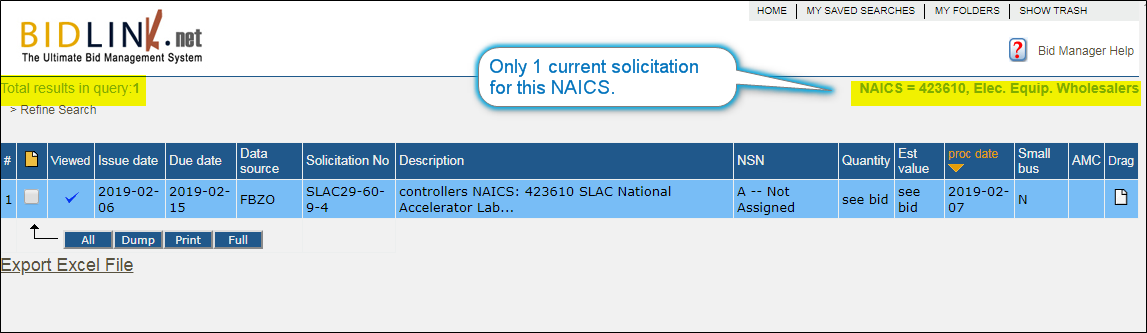
When we searched in BidLink.net for open solicitations under NAICS code 423610, this is all we got:
(Click to Enlarge)
The alternative? To get good results from your bid searches, you have to use the right Federal Supply Classes (FSC’s).
Try setting up a solicitation search in your preferred site to see the difference. A search with NAICS code 423610 will show very few solicitations, whereas searching with a code like FSC 5935 (the FSC for “Electrical Connectors”) gives MUCH better results, like this:
(Click to Enlarge)
To immediately improve the efficiency of your government solicitation search; use the applicable Federal Supply Class !
BidLink is a leading commercial provider of DoD procurement and government contracting data and bid management tools. To find DoD solicitations, research contracting history in detail, and bid more effectively, try BidLink.net. You can sign up for a FREE TRIAL and DEMO here >> Free Trial Signup.
—-
If you found this article interesting, try another >> DoD Procurement; Acquisition Method Codes (Part 1)
—-
Understanding and screening solicitations for their Acquisition Method Code (AMC) and Acquisition Method Suffix Code (AMSC) is important because it quickly reveals if your company is eligible to bid on the solicitation and indicates special technical characteristics of the item. So, by correctly interpreting the item’s AMC / AMSC you’ll know right-off-the-bat if you should even consider the solicitation.
What AMC / AMSC Mean
DoD buyers use AMC/AMSC when they create solicitations. Each National Stock Number (NSN) has its own AMC/AMSC. The unique two place code describes (a) the part’s level of “acquisition competitiveness” and, (b) the availability of supporting technical data. A part’s AMC/AMSC often changes over time leading to greater opportunities for suppliers.
We’ll look at each code separately and then explain how to use them advantageously.
AMC – Acquisition Method Code is single digit code that describes the type of supplier eligible to supply the part. One of the following six numbers will appear (what each code means to the buyer is also defined here):
1 – Acquire the part competitively.
2 – Acquire the part competitively for first time (similar to 1).
3 – Acquire the part directly from its manufacturer, only.
4 – Acquire the part directly from its manufacturer only, for the first time. (similar to 3).
5 – Acquire the part directly from its prime contractor only (aka “sole source”).
0 – The part was not assigned AMC 1 – 5.
Some conclusions:
Resellers of every kind will be interested in solicitations with AMC 1 & 2; but resellers who are not Original Equipment Manufacturers (OEMs) will be disqualified from bids for parts with AMC 3 & 4.
OEMs want to further evaluate solicitations with AMC 3 & 4 that they can manufacture.
Resellers and OEMs may be interested in contacting the prime contractor for solicitations with AMC 5 to see if they can provide the part directly to the prime, as a subcontractor.
AMSC – Acquisition Method Suffix Code is a supplementary code that further explains the preceding AMC code. There are 19 AMSCs, many describing only fine differences in an item’s technical characteristics and/or the availability of technical data to support the item’s acquisition. We’ve simplified the grouping of AMSCs to suggest how you might wish to think about them, as follows:
Unconstrained Procurement (no significant barriers to acquisition) – A,
G, Z
Restrictions on source of supply (i.e. the item is source controlled, QPL, limited to existing sources, has special technical characteristics, there is insufficient data with which to source from new supplier, etc.) – B, C, D, H, K, L, M, N, P, Q, R, S, T, U, V, Y
Some Conclusions:
New opportunities are often found with AMSC “G” which signifies, “The Government has unlimited rights to the technical data, and the data package is complete.” New suppliers may still have to pass first article testing.
Even though a part has a restrictive AMSC code, it can be worth considering. For example, suppliers experienced with similar parts to the one being procured may be able to “reverse-engineer” the required part. The prospective supplier can then either contact the government buyer to ascertain the feasibility of second-source procurement, or supply it to the current source of supply.
Examples of Code Combinations Indicating Competitive Opportunities1G & 2G – Competitive with drawings available.
1T & 2T – Competitive but controlled by Qualified Products List (QPL). There are more opportunities here than you might realize. We’ll explain why active suppliers should be tracking these code combinations and how they can get on the QPLs and supply these parts, in Part 2 of this article.
1L & 2L – Competitive and the annual buy value of this part is < $10,000.
1Z & 2Z – Competitive and the part is considered a Commercial-Off-The-Shelf (COTS) item.
Unfortunately, AMC/AMSC codes are not usually listed in either the solicitation documents or on government websites such as FBO FedBizOpps (FBO) or DLA Internet Bid Board System (DIBBS). Rather, DoD will include in solicitation documents a statement like “full and open competition,” and will list the applicable drawing(s) and technical data in the government’s possession (note that this information infers that an AMC/AMSC “1G” or “2G” applies). To find this out, you’ll have to read through the solicitation document (see the following sample page). If you review multiple DoD solicitations for bidding opportunities, reading through all this information will take a very long time.
No AMC here
(click on image to enlarge)BidLink Streamlines Searches by AMC/AMSCBidLink does provide the AMC/AMSC for parts in DoD solicitations AND allows you to filter solicitations by AMC/AMSC code.
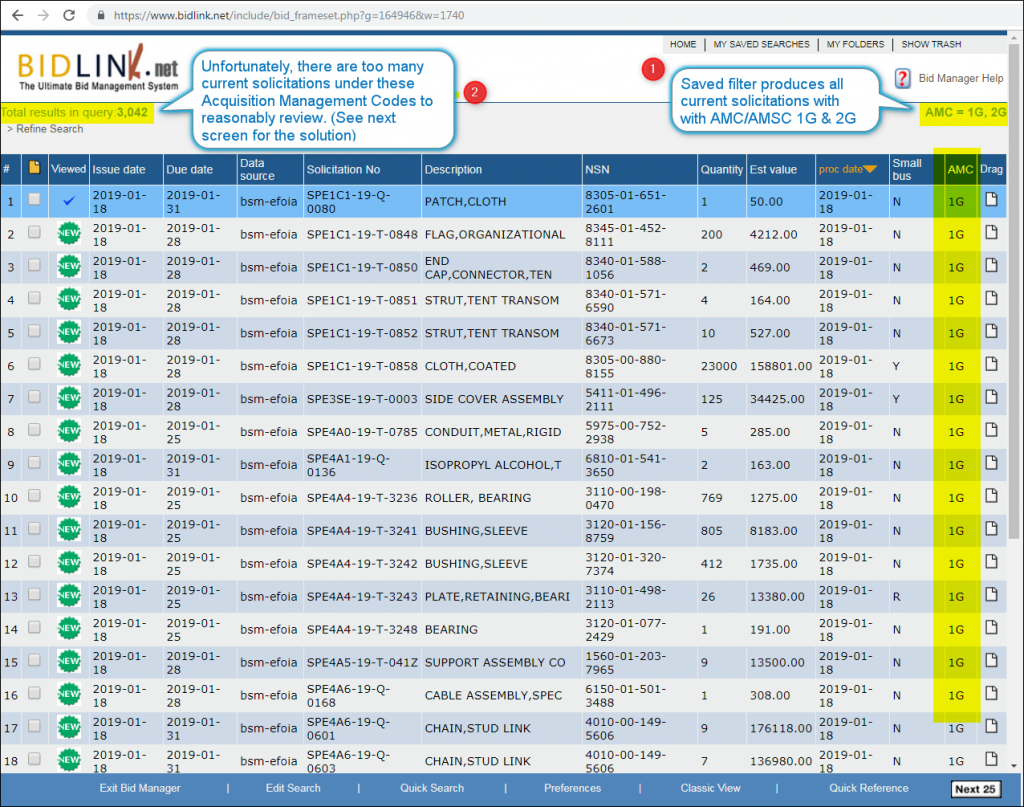
For example, let’s say that you wish to see all current solicitations with “1G” and “2G” AMC/AMSC. In BidLink.net you can easily generate a list of all current competitive solicitations, like this one:
AMC “1G” & “2G”
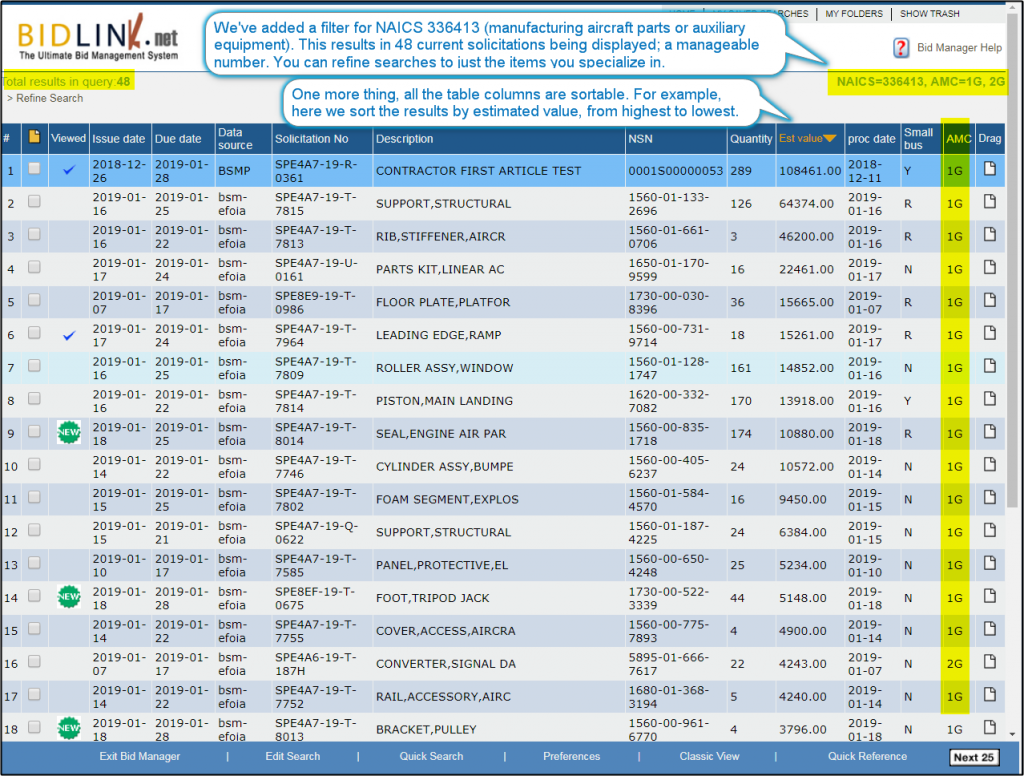
(click on image to enlarge)BidLink.net also provides multiple filters, so you can further refine your search:
AMC “1G” & “2G” filtered for aircraft parts
(click on image to enlarge)BidLink.net provides a user-friendly interface, designed to improve the efficiency and productivity of your government solicitations search and bidding workflow.
To learn more about BidLink.net, and to try it for free, click here >>BidLink.net FREE TRIAL.
If you found this article interesting, check this out >> BidLink.net — Better than DIBBSWin more defense contracts with BidLinkTweet
There must be an easier way !
In this post we’re going to quickly show you how BidLink makes it MUCH easier to find and bid the government solicitations that YOU’RE LOOKING FOR.
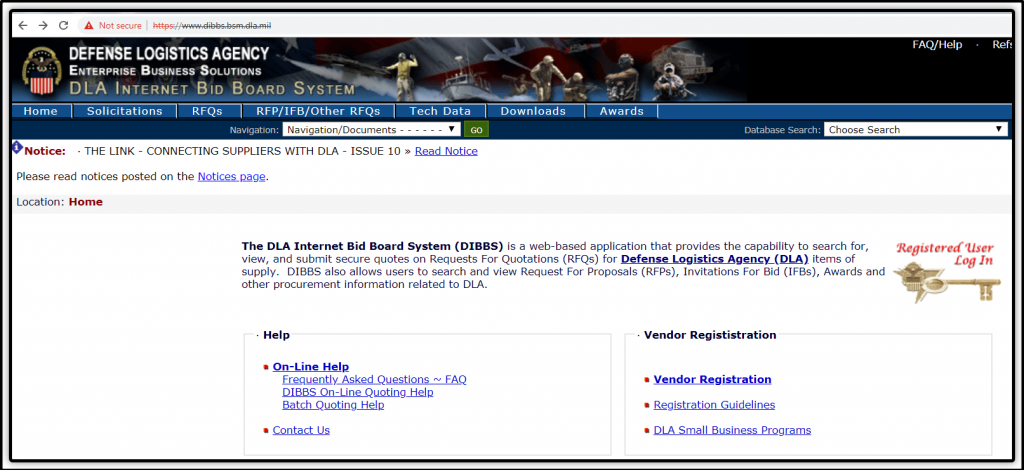
Anyone who’s worked with DIBBS (DLABid Board System) knows how frustrating it is to find government solicitations and RFQs that match your particular business.
Let’s say that you’re a distributor or reseller of “Mil-Spec” connectors, specializing in the following series…
MIL-DTL-38999
MIL-DTL-26482
MIL-DTL-24308
…and you want to review the current open solicitations from DoD and DLA for these connectors.
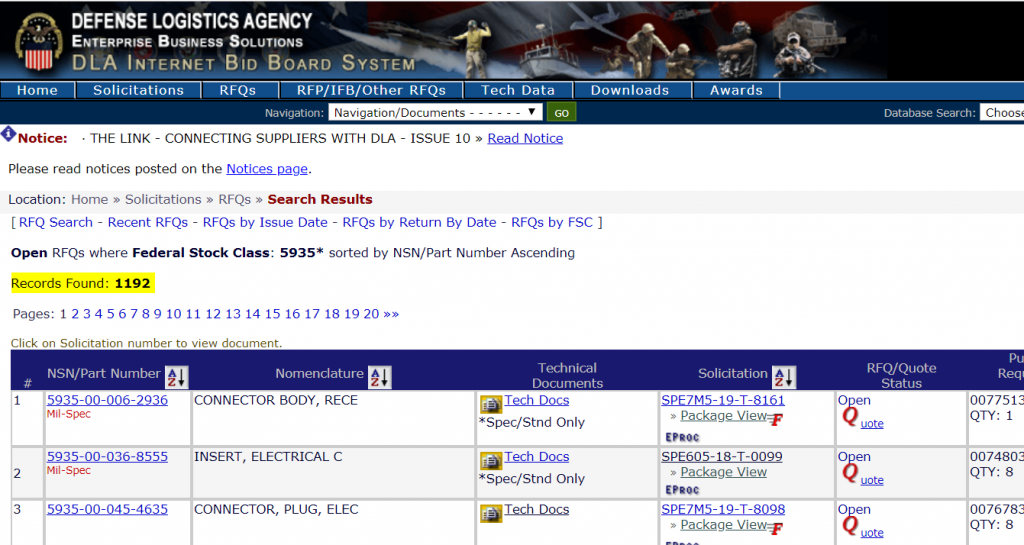
You can go to the DIBBS and look for all open solicitations for FSC (Federal Supply Class) 5935 (“Connectors, Electrical”) and you’ll get this….
TMI…. 1,192 records that you can slog through to find the ones that you might wish to bid on — what else do you have to this week?
Of course, DIBBS provides other search functions and parameters that you might use to narrow down your search.
Let’s see what results we get:
Obviously, DIBBS is not the place that you want to be spending your valuable time finding and researching government solicitations that you can bid on.
May we suggest that you search for government business on BidLink?
Here’s what you would, quickly find….
Ahhh, that’s better.
(click to enlarge)
….A user-friendly interface, created solely to improve the efficiency and productivity of your government solicitations search and bidding activity.
To learn more about BidLink.net, and to try it for free, click here >> BidLink.net Free Trial
If you found this article interesting and would like to read another, we recommend this one >> DoD Procurement; Acquisition Method Codes (Part 1)
*Above DIBBS and BidLlink.net search results current to 16:30 ET, 12/19/2018.
Free Trial for BidLinkTweet
In Part 1 of this series, we looked at how identifying items correctly in your search for government solicitations and contracts can really make a difference. Now, we’ll go a bit deeper into search technique for a Bid-To-Win approach.
Many companies that sell to the government search for government solicitations on the website FedBizOpps where agencies of the Federal Government and the Department of Defense (DoD) publicly post upcoming contracts actions (i.e. solicitations and advanced notice of contracts) expected to exceed $250,000 in value.
Frequently, individuals searching for contracting opportunities on FedBizOpps are not searching as efficiently as they can. This can become very time-consuming and costly as FedBizOpps posts, on average, 7,000 new opportunities weekly, covering the FULL range of products and services purchased by the government.
At BidLink.net we’ve helped tens of thousands of government contractors and suppliers improve their Bid-To-Win ratio. Over the years we’ve had many conversations with beginner to experienced government suppliers that indicate room for improvement in how they search for contract opportunities.
To illustrate some of the issues we’ve found that can interfere with efficient searching, here is made-up conversation of the type we often have with new users of our system:
BidLink.net — What type of product does your company manufacture or sell?
User — We make injection molded parts and can do rotomolding as well.
BidLink.net — Can you be more specific? Maybe if you give me the names of some of the items that you produce I can show you how to find open solicitations.
User — Oh, we sell things like dust caps, plastic parts, plastic cases and equipment cases. I know my competitors sell them to the government, but I can’t find any bids or DoD contracts for them.
BidLink.net — Well, how do you currently search for past sales and open government solicitations for the items that interest you?
User — We search fbo.gov for “injection molded parts,” the NAICS code 326199 and for names like “dust caps.” I keep on getting no results, or just lots of stuff unrelated to what we sell.
At this point, it’s clear to us where the problem lies. Fortunately, it’s one that’s easy to solve. But before we do so, let’s review what’s going wrong in this User’s searches.
As a general rule, the government buys things, not processes. In the above example, “injection molding,” is a manufacturing process. When a solicitation or contract award is posted by the government, the manufacturing process for the item is rarely mentioned. So, don’t search for government business opportunities by industrial capability or manufacturing process.
Another related point is that NAICS codes (the North American Industry Classification System), is far too broad a descriptor to be used for highlighting the SPECIFIC ITEMS that YOU sell. In the above example (of a manufacturer / supplier of dust caps and plastic parts) the applicable NAICS is 326199 (“All Other Plastics Product Manufacturing”). Yes, their NAICS code is correct for what they make and sell, but No, they’re not going to zero-in on government opportunities for their specific products by searching under this broad NAICS code — that search will return far too many results to be manageable.
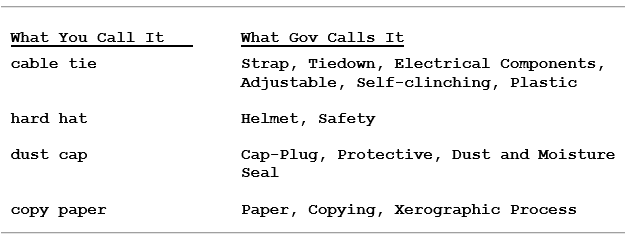
In the above example, after a couple of minutes of research in BidLink.net, we found the item description that pointed to what we all call “dust caps.” These, in turn, pointed to over 100 open solicitations for dust caps — one supplier has recently sold 55,231 dust caps under a single contract. The correct identification is: “Cap-Plug, Protective, Dust and Moisture Seal.”
So, here are the general steps you can use to quickly search for realistic government business opportunities for your company. This method involves following the path your competitors already use to obtain their government business.
Research the companies that you already know are supplying the government with the items you wish to sell (i.e. your competitors).
Review the line item detail on their past government contracts. Note which items you could supply, keeping an eye out for the item identifications under which the government orders the item(s) and the corresponding prices, and other contract details — to help you make informed competing bids in the future.
Then, make sure that you’re on the list to automatically receive notification of all solicitations for those same items.
Before long, you should be receiving in your Inbox all the same solicitations that your competitors are bidding on and winning as they build their government contracting business.
We believe that there’s no better tool than BidLink.net for consolidating this type work. You can see for yourself with a free trial. Along with your trial, we’ll be happy to suggest further improvements to your search technique and workflow that will increase your efficiency and help you develop a strong Bid-To-Win government contracting business.
—-
BidLink is a provider of DoD procurement research tools and has been a leading provider of industry marketing data relating to DoD solicitations and contracting for 18 years. Find defense contracts and research your competition. Learn more at www.bidlink.net